
WealthSure Income Tax Return: Filing, Payment and Expert Support Guide
WealthSure income tax return support helps Indian taxpayers file accurately, check taxes paid, avoid challan and assessment-year mistakes, and connect ITR filing with practical tax planning instead of treating return filing as a last-minute formality.
Key Takeaways
- WealthSure income tax return filing is useful when you want more than basic ITR submission; it helps connect documents, taxes paid, income disclosures, deductions and final verification.
- Online tax payment and ITR filing are linked; self-assessment tax, advance tax or regular assessment tax should be paid under the correct PAN, assessment year and payment category.
- AIS, TIS and Form 26AS should be reviewed before filing because income and tax-credit mismatches can delay processing or create follow-up queries.
- Simple salary cases may be handled through self-service, but capital gains, freelance income, NRI income, business income and notices usually need closer review.
- The challan receipt is important evidence; keep CRN, CIN, payment date, bank reference and tax category details safely.
- Refunds are processed by the Income Tax Department; no platform can guarantee a refund, but accurate filing can reduce avoidable delays.
- WealthSure can help with assisted ITR filing, tax-payment checks, advance tax review and expert guidance when the facts are complex or documents do not match.
What This Page Covers
- What people usually mean when they search for WealthSure income tax return support.
- How income tax return filing connects with online tax payment, challans, AIS and Form 26AS.
- When advance tax, self-assessment tax and regular assessment tax may apply.
- How to choose the correct assessment year and avoid payment-category mistakes.
- Documents and details to review before filing your ITR or making tax payment.
- Practical examples for salaried employees, freelancers, investors, NRIs and business owners.
- When self-service is enough and when WealthSure expert-assisted filing may be safer.
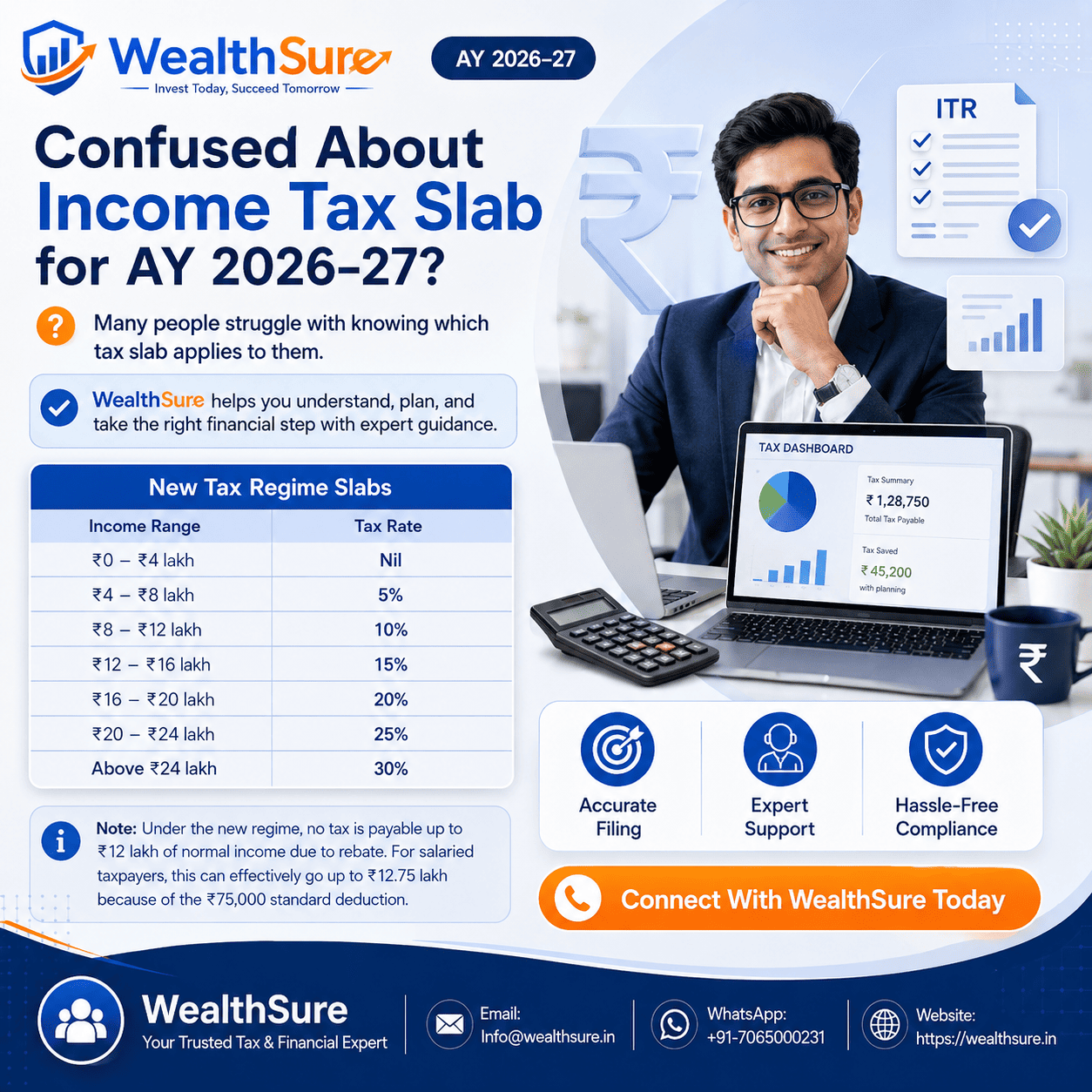
WealthSure income tax return is searched by Indian taxpayers who want to file an income tax return accurately, understand whether WealthSure can help with ITR filing, check documents required for income tax return filing, compare assisted filing with doing it themselves, and avoid common mistakes around online tax payment, challans, refunds and assessment year selection. For many users, the search is not just about a brand. It is about a practical problem: “Can I file correctly without missing income, choosing the wrong tax regime, paying tax under the wrong year, or creating a mismatch in AIS or Form 26AS?”
Income tax return filing in India has become more digital, but it has not become risk-free. A salaried employee may have Form 16 but also interest income, stock gains or rent income. A freelancer may receive digital payments but forget advance tax. An investor may sell mutual funds or shares and assume the tax will be handled automatically. An NRI may earn Indian rent or capital gains but may not know whether the return needs different disclosures. Even a simple tax payment can go wrong if the taxpayer selects the wrong assessment year, wrong payment category or files the return before the challan reflects properly.
This page explains how WealthSure’s income tax return support fits into the real filing journey. It covers self-service and expert-assisted filing, online tax payment, self-assessment tax, advance tax, challan verification, AIS, TIS, Form 26AS, refund context, document checks and common filing mistakes. The purpose is to help you understand what should happen before the return is filed, not merely what button to press on the last day.
WealthSure is positioned for taxpayers who want a practical, transparent and compliance-focused approach. You may be comfortable with self-filing for a simple return, or you may need expert support for capital gains, professional income, foreign income, NRI taxation, notices, revised returns or updated returns. Either way, the right approach is to file with complete information, maintain proof, verify tax credits and make decisions based on documents rather than assumptions.
Quick Answer: WealthSure Income Tax Return
WealthSure income tax return support helps Indian taxpayers prepare and file their ITR with a structured review of income, deductions, tax regime, tax credits, online tax payments and supporting documents. It is most useful when the taxpayer wants expert-assisted filing, document matching, tax-payment verification or help with complex income sources.
If your case is simple, such as one salary Form 16 with no additional income or mismatch, self-service filing may be enough. If you have capital gains, freelance income, business income, NRI income, foreign assets, property income, unpaid tax, a wrong challan, a notice or AIS mismatch, assisted filing can reduce avoidable errors.
For actual tax payment, taxpayers should use the official Income Tax e-Filing portal. WealthSure can help you interpret the tax liability, choose the correct payment type, review the challan, verify tax credits and file the ITR after the payment record is aligned.
Methodology and Official Sources
This article is based on practical income-tax filing and tax-payment workflows for Indian taxpayers. It uses common filing scenarios, compliance checkpoints and official tax concepts such as assessment year, financial year, challan, self-assessment tax, advance tax, AIS, TIS and Form 26AS.
For actual payment, taxpayers should use the official Income Tax e-Filing portal. For taxpayer information, the Income Tax Department explains the Annual Information Statement, the e-Filing portal provides guidance for e-Pay Tax, and taxpayers can refer to official help pages for payment status checks. Investors may also use SEBI sources for market and investor-protection context where capital gains arise from securities.
Tax rules, payment modes, challan screens and return utilities may change by assessment year. WealthSure can assist with interpretation, document preparation, tax payment review and compliance support, but final tax liability depends on income, deductions, exemptions, tax regime, documentation and applicable law.
What Is WealthSure Income Tax Return Filing?
WealthSure income tax return filing is a structured support process for preparing, reviewing and filing an Indian taxpayer’s ITR with attention to income disclosure, tax regime selection, tax credits, online payment, documents and post-filing verification.
Many taxpayers think ITR filing is only a form-submission task. In practice, it is a reconciliation exercise. Your salary, business receipts, bank interest, capital gains, rent, foreign income, TDS, TCS, advance tax, self-assessment tax and refund claim should make sense together. The return should also match the information visible in AIS, TIS and Form 26AS wherever applicable.
WealthSure’s role is to help users move through this process with clarity. A taxpayer may use free income tax filing for a simple case, choose ITR filing services for guided support, or ask an expert when the facts require judgment.
| Taxpayer need | Common situation | Useful WealthSure support |
|---|---|---|
| Basic filing | Salary income, Form 16, no major mismatch | Self-service or assisted filing review |
| Tax payment before filing | Remaining tax due after TDS or TCS | Self-assessment tax calculation and challan check |
| Advance tax planning | Freelance income, professional receipts, investment income | Advance tax calculation |
| Capital gains | Shares, mutual funds, property or foreign assets sold | Capital gains tax review |
| NRI taxation | Indian rent, interest, property sale or residential-status issue | NRI income tax filing support |
| Mismatch or notice | AIS mismatch, demand, notice or wrong filing | Income tax notice response |
The best choice depends on your facts. WealthSure should be seen as a filing and compliance support platform, not as a shortcut to guaranteed refund or guaranteed tax saving. Correct filing begins with correct information.
When Do You Need to File an Income Tax Return or Pay Tax Online?
You need to file an income tax return when your income, reporting requirement, refund claim, capital gains, foreign assets, business/professional income or tax compliance situation requires return filing for the relevant assessment year.
You may also need to pay income tax online when your final tax liability is higher than the tax already deducted or collected. This can happen even if you have Form 16. For example, bank interest may not be fully taxed through TDS, capital gains may not have enough tax deducted, freelance receipts may require advance tax, and switching tax regimes may change final tax liability.
Tax payment should usually be completed before filing the return if self-assessment tax is payable. The payment must be made under the correct PAN, assessment year and tax category. After payment, the challan details should be preserved and checked before completing the ITR.
Common reasons a taxpayer may need WealthSure assistance
- Salary plus capital gains, interest, rent, freelance income or foreign income.
- Uncertainty about old tax regime versus new tax regime.
- AIS or Form 26AS showing income that does not match personal records.
- Advance tax missed during the financial year.
- Self-assessment tax payable before ITR submission.
- Wrong assessment year selected while paying tax.
- Refund expected but bank account, TDS or return data needs review.
- Notice, demand, defective return or revised return requirement.
For simple cases, filing can be quick. For mixed-income cases, the time should be spent before filing, because correcting a careless return later can be more stressful than filing correctly the first time.
Assessment Year vs Financial Year: What Should You Select?
The financial year is the year in which you earn income, while the assessment year is the following year in which that income is assessed and the return is filed.
This is one of the most common tax-payment mistakes. If you earn income between 1 April 2025 and 31 March 2026, the financial year is FY 2025-26 and the assessment year is AY 2026-27. When paying self-assessment tax for that income, the assessment year must match the return you are filing.
| Concept | Meaning | Example | Why it matters |
|---|---|---|---|
| Financial year | Year in which income is earned | 1 April 2025 to 31 March 2026 | Used to identify the income period |
| Assessment year | Year in which income is assessed and ITR is filed | AY 2026-27 | Used while filing return and paying related tax |
| Wrong year selection | Payment made for another year | AY 2025-26 selected by mistake | Can create tax-credit mismatch for intended ITR |
Before making payment, pause and check the year printed on your computation sheet, ITR utility or expert working. If you are unsure, ask a tax expert before paying. Correcting a wrong-year payment can require extra follow-up.
Types of Online Income Tax Payments in India
Online income tax payment may be advance tax, self-assessment tax, regular assessment tax or another applicable tax category depending on why the amount is being paid.
The category matters because the payment must match the legal purpose. A taxpayer filing an ITR after the year ends usually pays self-assessment tax if there is unpaid tax. A freelancer or business owner may need to pay advance tax during the year. A taxpayer receiving an intimation or demand may need to pay regular assessment tax.
Paid during the financial year when estimated tax liability after TDS/TCS requires instalment payment. Common for freelancers, business owners, investors and people with significant non-salary income.
Paid after the financial year ends but before filing the ITR when the final computation shows tax still payable.
Paid after the Income Tax Department raises demand through intimation or assessment. It should be matched with the relevant notice or demand details.
Depending on the portal and applicable law, other categories may apply. Select only the category that matches the tax liability and year.
Payment modes available through the portal may include net banking, debit card, authorised bank options, bank counter, RTGS/NEFT, payment gateway and UPI, depending on current portal facilities and bank availability. The official portal should be treated as the source of truth for available modes.
Details to Check Before Making Tax Payment
Before making tax payment online, check the taxpayer identity, assessment year, tax category, amount, interest, fee, bank mode and return computation.
Small errors can create large inconvenience. If the tax was paid under the wrong PAN, it may not appear in your tax credit. If the wrong assessment year was selected, the payment may not match the return. If the payment category is wrong, you may need extra correction or departmental follow-up. If the challan receipt is lost, proving payment later becomes harder.
Pre-payment checklist
- Confirm PAN, name and login account.
- Confirm financial year and assessment year.
- Confirm whether the payment is advance tax, self-assessment tax or regular assessment tax.
- Confirm tax, surcharge, cess, interest and fee components where applicable.
- Check whether TDS, TCS and advance tax already paid are included in the computation.
- Check AIS, TIS and Form 26AS where relevant before final payment.
- Keep a screenshot or PDF of the computation used for payment.
- Use the official portal and save the challan receipt after payment.
If you are filing through WealthSure, share the tax-payment proof with your filing expert or upload it as requested so that the return can reflect the correct tax-paid details.
Step-by-Step Guide to WealthSure Income Tax Return Filing
The WealthSure income tax return process starts with documents and ends with a verified, filed return, not merely with entering numbers into an ITR form.
The exact steps vary by user type, but the broad flow is consistent. The taxpayer gathers documents, reviews income, checks tax credits, calculates liability, pays any remaining tax, files the return, e-verifies it and keeps proof. Expert-assisted plans add a review layer where a tax professional checks whether the return is consistent with documents and tax records.
Step 1: Collect and upload documents
Start with PAN, Aadhaar, Form 16, bank interest details, Form 26AS, AIS, TIS, capital gains statements, rent or property income details, foreign income details, loan certificates, deduction proofs and any notice or demand communication. Salaried users may begin with uploading Form 16, but Form 16 alone may not cover every income source.
Step 2: Review income and tax regime
The return should include salary, interest, capital gains, rent, business or professional income, foreign income and any other taxable income as applicable. Tax regime comparison should be based on eligible deductions, exemptions, employer details and future planning, not just a headline tax rate.
Step 3: Match tax credits
Review TDS, TCS, advance tax and other payments. If the tax credit does not match, filing without understanding the mismatch can delay processing or create a demand. AIS and Form 26AS are especially important for income and tax-credit reconciliation.
Step 4: Pay remaining tax if required
If final tax is still payable, use the e-Pay Tax facility on the official portal. Save the challan receipt and wait for the payment record where needed. WealthSure can help review whether the payment is being made under the correct category and assessment year.
Step 5: File and e-verify the return
After the return is prepared, it should be reviewed and filed. The process is incomplete unless the return is verified through the available e-verification method or other valid method. Keep the acknowledgement, computation, challan and supporting documents safely.
Practical Examples: How Different Taxpayers Use WealthSure Income Tax Return Support
Practical tax filing decisions depend on the taxpayer’s income pattern, documents and timing. The following examples show how the same filing season can create different needs.
Example 1: Salaried employee paying self-assessment tax before filing ITR
Neha works in Pune and has Form 16 from her employer. During the year, she also earned bank interest and short-term gains from equity mutual funds. Her employer deducted TDS on salary, but not enough tax was paid on the additional income. The common mistake would be to file the return assuming Form 16 is complete. The correct approach is to include interest and capital gains, calculate final liability, pay self-assessment tax under the correct assessment year, verify the challan and then file the return. WealthSure support can help her review Form 16, AIS, capital gains data and challan details before submission.
Example 2: Freelancer paying advance tax to avoid interest
Rahul is a freelance designer receiving payments from Indian and overseas clients. Because there is no employer deducting salary TDS, his final tax liability can build up during the year. The common mistake is waiting until ITR filing season and then discovering a large tax amount plus possible interest. The correct approach is to estimate income periodically, claim eligible business expenses with documentation, and pay advance tax instalments where applicable. WealthSure’s business and professional income filing support can help organise receipts, expenses, advance tax and final ITR filing.
Example 3: Investor paying tax on capital gains before ITR filing
Amit sold listed shares, equity mutual funds and debt funds during the year. He downloaded broker statements but did not compare them with AIS. The common mistake is reporting only one broker’s data or ignoring dividend income. The correct approach is to consolidate capital gains, classify short-term and long-term gains, include dividends and pay any remaining tax before filing. A WealthSure expert can help review capital gains statements and tax treatment, especially where multiple brokers, bonus shares, corporate actions or foreign assets are involved.
Example 4: NRI paying tax on Indian income
Priya lives in Dubai but earns rent from an Indian property and interest from Indian deposits. She assumes she does not need to file because she lives outside India. The common mistake is ignoring Indian-source income and TDS credit. The correct approach is to review residential status, Indian taxable income, TDS, DTAA relevance where applicable, bank account details and ITR requirement. WealthSure’s NRI tax filing support can help her organise documents and avoid treating domestic filing rules as optional.
Example 5: Taxpayer whose money was deducted but challan was not generated
Sanjay attempted to pay self-assessment tax through online payment. His bank account showed debit, but the challan was not visible immediately. The common mistake would be to panic and pay again without checking status. The correct approach is to save the bank reference, check payment status on the official portal, wait for processing where reasonable and raise a support query if required. WealthSure can help him decide whether to wait, verify, document the issue or proceed with filing after payment confirmation.
Income Tax Return Filing Checklist Before You Submit
Before filing your ITR through WealthSure or on your own, run a final checklist. A few minutes of review can prevent mismatches, wrong refund claims and avoidable notices.
- Confirm PAN, Aadhaar, name, date of birth and bank account details.
- Review Form 16 and do not assume it covers all taxable income.
- Check AIS, TIS and Form 26AS for income and tax credits.
- Include interest, dividends, capital gains, rent, freelance income and foreign income where applicable.
- Compare old and new tax regimes using actual eligible deductions and exemptions.
- Pay self-assessment tax if final tax is due after TDS, TCS and advance tax.
- Verify challan details before entering or confirming tax-paid information.
- E-verify the return after filing and save acknowledgement.
- Keep computation, challans, bank statements and proofs for future reference.
- Ask an expert before filing if there is a mismatch, notice, foreign income, capital gains complexity or wrong-year tax payment.
Common Mistakes to Avoid in WealthSure Income Tax Return Filing
The most common ITR mistakes come from incomplete information, wrong tax payment details and filing without checking official tax records.
| Mistake | Why it creates a problem | Better approach |
|---|---|---|
| Filing only from Form 16 | Interest, gains, rent or other income may be missed | Review AIS, TIS, Form 26AS and personal records |
| Choosing the wrong assessment year | Tax payment may not match the intended return | Confirm FY and AY before payment |
| Ignoring self-assessment tax | Return may show tax payable or processing issues | Pay remaining tax and verify challan |
| Filing before payment confirmation | Tax credit may not be traceable immediately | Save receipt and check payment status |
| Assuming refund is guaranteed | Refund depends on correct return and department processing | File accurately and verify bank details |
| Not e-verifying the return | Return filing remains incomplete | E-verify through available valid methods |
| Ignoring notice or mismatch | Issue can grow if not handled in time | Use expert review or notice response support |
These mistakes are avoidable. The best filing approach is calm and documented: gather information, verify, compute, pay if required, file, e-verify and retain proof.
How WealthSure Can Help with Income Tax Return Filing
WealthSure can help Indian taxpayers file income tax returns with document-led preparation, tax-payment checks, regime comparison, capital gains review, NRI support, revised return support and expert guidance when a return is not straightforward.
The support should match the problem. If you have a basic salary return, start with income tax return filing services or free income tax filing. If you have unpaid tax, use advance tax calculation or expert computation support. If you need a professional review before submission, choose an assisted plan such as ITR assisted filing. If you are unsure, ask through Ask Our Tax Expert.
Summary: WealthSure Income Tax Return
WealthSure income tax return support is designed for Indian taxpayers who want to file accurately, understand their tax payable or refund position, verify challans and connect income tax return filing with real documentation. It is especially useful when income is not limited to one salary Form 16.
The most important filing checks are income completeness, tax regime selection, TDS/TCS matching, AIS and Form 26AS review, correct assessment year, correct tax payment category, challan proof and e-verification after filing. Online tax payment should be made through the official Income Tax e-Filing portal, and the payment record should be preserved.
Self-service may be enough for simple cases. Expert-assisted support is safer when there are capital gains, freelance receipts, NRI income, foreign assets, business income, advance tax, self-assessment tax, a notice, a mismatch or uncertainty about filing details.
FAQs on WealthSure Income Tax Return
What is WealthSure income tax return filing?
WealthSure income tax return filing is a tax filing support approach for Indian taxpayers who want to prepare, review and file their ITR with better document matching, tax-payment checks and expert guidance where required. The aim is not only to submit a return but to make sure income, deductions, taxes paid, AIS, Form 26AS and refund details are aligned before filing. This matters because a return can look complete on the surface while still missing bank interest, capital gains, rent, freelance income, foreign income or tax credits. WealthSure can help users choose self-service or assisted filing depending on complexity. Simple salary cases may need limited support, while mixed-income cases often need a deeper review before submission.
Can I file my income tax return myself and still use WealthSure for review?
Yes. Many taxpayers can prepare a return themselves but use expert help for review, tax regime comparison, capital gains, foreign income, business income, advance tax or notice-risk checks. Self-service may be enough for a simple salary case where Form 16, AIS and Form 26AS match and no additional tax is payable. Review becomes useful when the taxpayer is not sure whether all income has been included, whether deductions are allowed, whether the correct assessment year was selected or whether a tax payment has reflected properly. WealthSure’s assisted filing support can act as a practical second layer before the return is submitted and e-verified.
Which documents are required before filing an income tax return through WealthSure?
The documents usually include PAN, Aadhaar, Form 16, salary slips, bank interest details, Form 26AS, AIS, TIS, investment proofs, rent receipts where relevant, capital gains statements, home loan interest certificates and details of taxes already paid. The exact list depends on income sources, deductions, residential status and the selected tax regime. Freelancers may need invoices, expense records and bank statements. Investors may need broker-wise capital gains reports. NRIs may need residential-status details, Indian income records and TDS certificates. The purpose of collecting documents is to prepare a return that matches available tax records and reduces avoidable mismatch or processing issues.
How does online tax payment connect with income tax return filing?
Online tax payment connects with ITR filing because the return should reflect the correct amount of tax already paid. If there is remaining tax after TDS, TCS and advance tax, the taxpayer may need to pay self-assessment tax before filing. The challan details should be checked in payment history, AIS or Form 26AS where available. A return filed without considering the latest tax payment may show tax payable or create a mismatch. Taxpayers should keep the CRN, CIN, bank reference number, payment date and challan receipt safely. WealthSure can help review whether the payment type, assessment year and return computation are aligned before submission.
What is the difference between advance tax, self-assessment tax and regular assessment tax?
Advance tax is paid during the financial year when tax liability after TDS crosses the applicable threshold. Self-assessment tax is paid after the year ends but before filing the ITR, when the taxpayer calculates remaining tax due. Regular assessment tax is paid after the Income Tax Department raises a demand through assessment or intimation. The difference is important because the payment category should match the reason for payment. A freelancer may need advance tax during the year. A salaried employee with additional capital gains may pay self-assessment tax before filing. A taxpayer responding to a demand may pay regular assessment tax. Wrong selection can create matching and compliance difficulties.
What happens if I choose the wrong assessment year while paying tax?
Choosing the wrong assessment year can make the payment difficult to match with the intended ITR. The taxpayer may see a mismatch in tax credit or may need to take corrective steps through the portal or with departmental support. Before paying, confirm the financial year, assessment year, PAN, payment category and tax type carefully. For example, income earned during FY 2025-26 is generally filed in AY 2026-27. Selecting AY 2025-26 by mistake may cause the payment to appear against the wrong year. If this has already happened, keep the challan and bank reference details and seek expert help before filing or making another payment.
How can I verify whether my tax payment has been recorded?
Tax payment can generally be verified through the e-Filing portal payment history, challan receipt, AIS, Form 26AS or tax credit view after the payment is processed. Some payments may take time to reflect. Keep the challan receipt, CRN, CIN, bank reference number and payment date safely for ITR filing and future queries. If the payment does not appear immediately, check the official payment status service and bank statement before making another payment. For assisted filing, share the challan with your tax expert so the ITR can include the correct tax-paid details. Do not rely only on memory or SMS confirmation when finalising tax-paid information.
What should I do if money is deducted but challan is not generated?
If money is deducted but the challan is not generated, first check payment status on the e-Filing portal and your bank account statement. Do not immediately make a duplicate payment unless you have confirmed failure status. Keep the transaction reference, bank message and screenshot. Sometimes the status may update after processing; in other cases, the transaction may fail and the bank may reverse the amount. If the amount remains unresolved, raise the issue through the official help channel or seek expert support. WealthSure can help you review the facts, preserve evidence and decide the next step before filing the return or making another payment.
Is WealthSure income tax return filing useful for freelancers and investors?
Yes, WealthSure income tax return filing can be useful for freelancers and investors because their returns often involve advance tax, professional receipts, expenses, GST records, capital gains, dividend income and AIS matching. A freelancer may need to estimate tax during the year and maintain expense documentation. An investor may need to classify short-term and long-term capital gains and reconcile broker statements with AIS. Expert review can help reduce avoidable errors, though final tax depends on actual income, documentation and applicable law. WealthSure support is especially helpful when the taxpayer has more than one income source or is unsure about tax payment before filing.
When should I ask a WealthSure tax expert before filing my ITR?
You should ask a WealthSure tax expert when you have multiple income sources, capital gains, foreign income, NRI status, business or professional income, a tax notice, mismatch in AIS or Form 26AS, unpaid tax, wrong challan details or uncertainty about old versus new tax regime. Expert help is most useful before filing rather than after a mistake is noticed. A review can help you check whether income is complete, whether tax credits match, whether self-assessment tax is required and whether the return has been e-verified after submission. For simple cases, self-service may be enough; for complex cases, assisted filing can provide better structure and confidence.
Conclusion: File with Documents, Proof and the Right Tax Context
WealthSure income tax return filing is most valuable when it helps you move beyond last-minute form filling. A good return should reflect correct income, correct tax regime, correct tax credits, correct online payment, correct assessment year and complete supporting proof. This is how taxpayers reduce avoidable mismatches and make the filing process more reliable.
If your return is simple and records match, self-service may be enough. If your situation includes self-assessment tax, advance tax, capital gains, freelance income, NRI income, foreign income, notices, refunds, wrong challan details or AIS mismatch, expert-assisted support may be the safer route. WealthSure can help you connect tax payment, document review and ITR filing in a practical and transparent way.
At WealthSure, we don’t just file taxes — we simplify your financial journey and help you build long-term wealth with confidence.